 Zornov
DocsGetting startedZornov 0.1.2
What is Zornov
Zornov is a free, open-source film studio for Mac, Windows and Linux. Learn what you can make with it and how this manual is organised.
Zornov is a free, open-source film studio for Mac, Windows and Linux. You edit, grade, animate, build 3D scenes, write the music and export the finished film in one app, and an AI editor can work on the same timeline while you do.
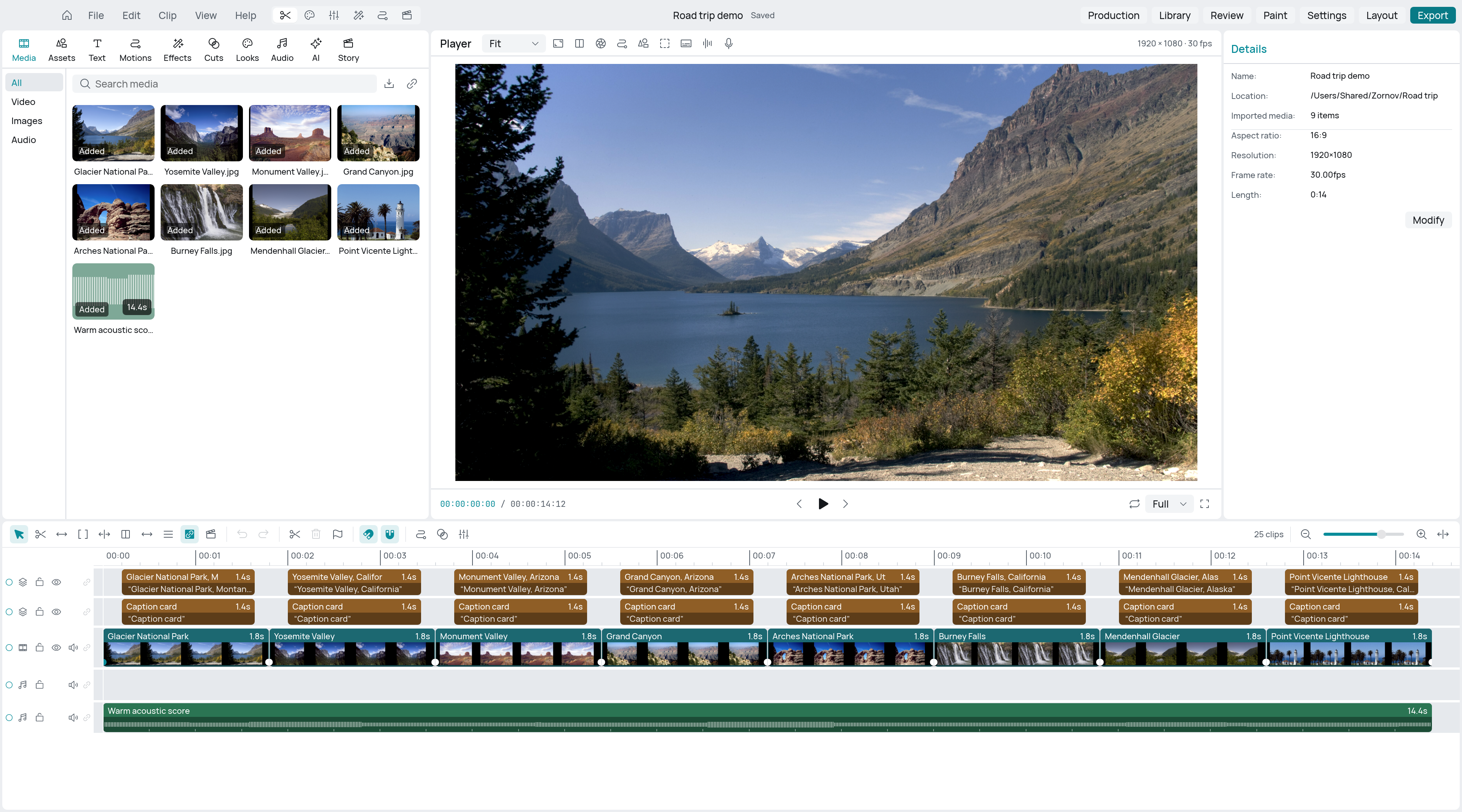
What you can make
People use Zornov for:
- YouTube videos, vlogs, podcasts and interviews
- short films and documentaries
- music videos cut to the beat
- vertical videos and ads for social apps
- animated stories with puppets or 3D characters
- titles, motion graphics and explainer videos
- 3D scenes, models and walkable worlds, rendered as shots
The start screen has templates for a YouTube video, short film, music video, animated story, documentary, podcast and ad. Each one sets the frame size, frame rate, lanes and markers for that kind of film, so you can start cutting straight away.
Who it is for
Zornov is for anyone who makes video, from a first edit to a finished film. If you are new to editing, the guided sample projects and the built-in help get you going. If you already edit, you get the tools you expect: a magnetic timeline, three-point editing, trim modes, keyframes, scopes and professional delivery formats.
You don't need to use AI. The AI editor is off until you turn it on, and the rest of Zornov works without it, and offline.
What's in the box
Zornov is one app with several departments. You move between them without changing programs or exporting files.
| Department | What it does |
|---|---|
| Edit | A magnetic timeline with lanes, markers, groups and nesting. Ripple, roll, slip and slide trims, source and record editing, J and L cuts, speed ramps, freeze frames and reverse. |
| Titles and motion | Titles, lower thirds, callouts and 3D text, edited on the canvas. Keyframes, easing curves, motion presets and a graph editor. |
| Colour and effects | Colour grading with scopes, looks and shot matching. Effects, transitions, blend modes, masks, keying, tracking and stabilising. |
| Sound | A mixer with buses and loudness, an effects chain on every clip, dialogue cleanup, and a composer that writes original music in 18 genres. More than 50 sound effects, footsteps and animal voices, and narration. |
| 3D | Modelling, materials and sculpting. Characters with hair and clothes, toon and anime looks, shapes made from mathematics, physics, and worlds with terrain, water and sky. |
| Animation | Puppets with pins, bones and scissor cuts that walk and lip sync, plus vector illustration. |
| Paint | Painting and photo editing on still pictures, with layers, brushes and selections. |
| Production | A production office for the project: breakdown, stripboard, budget and task board. |
| Export | Files for the web and social apps, and masters such as ProRes, DNxHR, EXR and DPX. |
| AI editor | Describe a job in plain words and it does it on your timeline, with the same tools you have. Undo this request takes back what it did for one request, and ⌘Z undoes only your own edits. |
Zornov also works with AI assistants you already use. Claude Code, Claude Desktop, Codex and other assistants that speak MCP can open a project, edit it and export it with Zornov's tools. See Use Zornov from Claude, Codex and other AI assistants.
The interface is available in English, Hindi, Spanish, French, German, Japanese, Simplified Chinese, Arabic and Persian. Choose one in Settings > General > Language.
How this manual is organised
- Getting started takes you from installing Zornov to your first export: Install Zornov, Make your first project, A tour of the window, Keyboard shortcuts and Update and uninstall.
- Editing covers the timeline, clips and trimming, titles, captions, effects and transitions, colour, compositing and export.
- Sound covers audio and mixing, music and sound effects and voices.
- 3D covers scenes and models, shapes from mathematics, characters, animation and puppets, worlds and physics and lights and cameras.
- AI covers the built-in AI editor, AI assistants and what stays on your computer.
- Reference has the command line, file formats, system requirements, troubleshooting and the FAQ.
Get help
- In the app: press F1 to search the help. If a panel has keyboard focus, F1 opens the article about that panel. The Help menu also has the welcome tour and a list of keyboard shortcuts.
- Questions and ideas: ask in GitHub Discussions.
- Bugs: open an issue at github.com/zornov/zornov/issues. Say which version of Zornov and which operating system you use, and what you did before the problem appeared.
- Security problems: don't post them in public. Open the repository's Security tab on GitHub and choose Report a vulnerability.
Licence
Zornov is free and open source under the GNU Affero General Public License v3.0 or later. A commercial licence is available from Ashrox LLC.
Something wrong or missing on this page? Tell us on GitHub.